
 BVM Insights Team
A physician recommendation gives a prospective patient a name and a specialty. It does not answer every question that person may have before contacting an unfamiliar office. Between the referral and the appointment request, the practice website either reinforces the recommendation or leaves practical questions unanswered. For example, a primary care provider hands a patient a card for "Dr. Smith, Orthopedics." The patient searches the name, lands on a 5-year-old bio listing three different office addresses, and abandons the search to look for a provider closer to home.
The website is only one part of the referral journey. Intake processes, scheduling constraints, health insurance requirements, personal circumstances, and other non-digital factors may all affect what happens after a referral. For practice leaders watching steady referral volume alongside inconsistent appointment requests, the digital portion of that gap is still worth examining.
The framework below maps the questions a referred patient may try to answer, identifies the pages responsible for each answer, and assigns ownership when something is unclear. It does not prove why any individual patient chose not to schedule. It reveals where the digital pathway becomes difficult to follow.
Why the Referral Is Only the Beginning of the Validation Journey
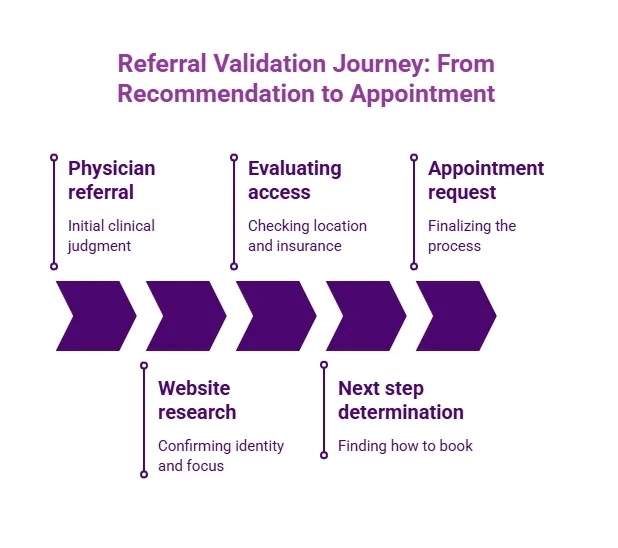
A referring physician's recommendation signals clinical judgment, not necessarily the practical information a prospective patient needs before contacting an unfamiliar office. The referral establishes initial relevance. The specialty-practice website serves a different purpose: it can help someone confirm the physician's identity, understand the practice's reviewed clinical focus, evaluate access details, and find the appropriate next step.
A prospective patient who chooses to research a referral may look for answers to five questions:
- Is this the correct physician, practice, and location?
- Does the specialist address the relevant condition or treatment need?
- What supports confidence in the physician or the practice?
- Is the care accessible (location, insurance, referral requirements, availability)?
- What is the next step, and how do you take it?
These five categories form what this article calls referral validation: the practical process of reviewing information a prospective patient may seek between receiving a specialist recommendation and requesting an appointment. The website is one of several information sources a prospective patient may use, and not every referred patient follows every stage. Treat these categories as an audit framework, not a proven universal sequence. No website can determine whether a specialist is clinically appropriate for an individual patient.
When leadership assumes a strong referral is enough, or that inconsistent follow-through must be an intake problem, the website's role goes unexamined. Multiple factors (operational, personal, clinical) may influence whether a referral becomes an appointment request. This audit examines only the observable digital portion.
Map the Referral-to-Search Journey Before Evaluating Individual Pages
Before auditing individual pages, walk the full path a referred patient might take. Start by examining what the referring office actually provides. A referral might include a physician name, a specialty, a phone number, and a brief explanation, or it might include only a name and a vague instruction to "call Dr. Chen's office." The completeness of that starting point shapes which questions the prospective patient still needs to answer.
The table below organizes the journey into five stages. Use it as an internal audit model, not a claim about how every patient behaves.
| Stage | What the Patient May Try to Confirm | Pages Likely Involved | Possible Confidence Gap |
|---|---|---|---|
| Recommendation received | Physician name, specialty, office location, or phone number | Referring office handout, referral note, or verbal instruction | Incomplete or outdated referral details; website does not match the information supplied with referrals |
| Name and specialty confirmation | Correct physician, correct practice, correct location | Physician bio, practice homepage, Google Business Profile | Thin bio, wrong location listed, or physician not clearly associated with the practice |
| Condition or treatment relevance | Does this specialist address my specific concern? | Condition pages, treatment pages, service-line descriptions | Pages that list services without connecting them to specific physicians |
| Trust and access check | Credentials, experience, reviews, insurance accepted, referral requirements, office hours | Physician bio, insurance page, location page, third-party review profiles | Credentials listed without context, insurance information outdated, or referral requirements unclear |
| Appointment decision | How do I request an appointment, and is the path consistent? | Appointment page, contact page, phone number, online scheduling tool | Multiple conflicting calls to action, broken forms, or instructions that vary by page |
A confidence gap is missing, conflicting, stale, or difficult-to-find information that leaves an important question unresolved. It does not prove that the gap caused someone to abandon an appointment request. A page handoff is the connection that guides a visitor from one page to the next authoritative source or action. An appointment path is the full sequence of clicks from the first page to the appointment request form.
An administrator might walk this path by searching the physician's name in a private browser window and clicking through as if unfamiliar with the office. The goal is not to grade individual pages yet, but to see whether the full sequence holds together. Ranking for a physician's name does not, by itself, establish that the landing experience answers questions about identity, relevance, access, and next steps.
Five Confidence Gaps That Can Weaken Referral Follow-Through

Not every practice will have all five gaps below, and they should not be ranked by impact without evidence.
Identity Gap
The physician, specialty, office, or practice affiliation is unclear. A bio page may not specify which location the physician practices at, which group they belong to, or whether they accept new patients. Check whether names and credentials appear consistently across search results, physician bios, location pages, and appointment instructions. On mobile screens, confirm that essential identity details remain visible without unnecessary navigation.
Relevance Gap
Condition and treatment pages do not clearly connect to the referred physician. A biography written like a curriculum vitae may document credentials without explaining the physician's current clinical focus in patient-readable language. Condition and treatment pages may also omit the appropriate physician or location connections. For example, a patient referred for a shoulder evaluation might find the surgeon's bio mentioning "sports medicine" but no page explaining the practice's approach to shoulder conditions.
These clinical relationships require current practice documentation and qualified clinical review. Marketing teams should never infer them from keywords, competitor pages, or unreviewed biographies. Practices that maintain separate condition, treatment, and physician content paths can make these relationships clearer. Any practice-specific condition-to-physician relationship should be confirmed by a qualified clinical reviewer.
Credibility-Context Gap
Credentials and reputation information appear without context that helps a non-clinical reader understand what they mean. Professional abbreviations may be accurate but difficult for a general reader to interpret. A detailed CV is not the same as a patient-accessible physician bio; credentials must be accurate, understandable, and connected to reviewed clinical focus. Online reviews provide one layer of context, but ratings do not prove medical quality or individual clinical fit.
Access Gap
Location, health insurance, referral requirements, or appointment instructions are incomplete, inconsistent, or outdated. In a hypothetical example, a practice's physician page, location page, and appointment form might each show a different office address. Operational teams should verify this information because it can change independently of physician and condition content. Mobile testing should confirm that contact instructions, forms, and relevant requirements remain easy to locate.
Handoff Gap
Internal pages do not lead naturally to the correct next page or action. A physician bio might end without a link to the appointment page. A condition page might describe a treatment without identifying which physician performs it. The appointment path might offer a generic "Contact Us" when the patient expected scheduling for a specific provider. Testing handoffs on mobile is especially useful because navigation elements and calls to action may render differently on smaller screens.
Quick confidence-gap checklist:
- ☐ Can the patient confirm the correct physician, practice, and location?
- ☐ Do condition and treatment pages connect to the relevant physician?
- ☐ Are credentials explained in patient-accessible language?
- ☐ Are reviews presented as context, not proof of clinical quality?
- ☐ Is insurance, referral, and location information current and consistent?
- ☐ Does every key page lead clearly to the next step?
- ☐ Does the journey hold together on mobile?
- ☐ Is each answer accurate, easy to find, consistent across pages, professionally reviewed, and connected to a clear next step without pressure or unsupported urgency?
Run a Referral-to-Search Validation Audit on One Service Line
You do not need to rewrite the entire website to begin. Select one referral-heavy physician, condition, treatment, specialty, or service line and follow these steps:
- Choose one service line that receives a meaningful volume of referrals.
- Record the information a referring office typically provides when sending a patient your way.
- Search the exact physician and practice names in a neutral (private or incognito) browser session.
- Review the physician, condition, treatment, location, insurance, and appointment pathways in sequence.
- Test the same path on a mobile device.
- Record missing, conflicting, stale, or hard-to-find information.
- Assign an owner and a reviewer for each finding.
- Prioritize inaccuracies and broken handoffs before adding new content.
| Journey Stage | Patient Question | Expected Page | What to Inspect | Owner | Status | Next Action |
|---|---|---|---|---|---|---|
| Name confirmation | Is this the right physician and practice? | Physician bio | Name, photo, specialty, practice affiliation, location | Marketing / Clinical | ☐ Clear ☐ Unclear ☐ Missing | |
| Condition relevance | Does this specialist treat my concern? | Condition or treatment page | Connection between the condition and the physician; reviewed clinical accuracy | Clinical / Marketing | ☐ Clear ☐ Unclear ☐ Missing | |
| Credential context | What qualifies this physician? | Physician bio | Board certification, training, experience described in patient-accessible language | Clinical | ☐ Clear ☐ Unclear ☐ Missing | |
| Reputation context | What do other patients say? | Review profiles, physician bio | Reviews visible or referenced; not presented as proof of clinical quality | Marketing | ☐ Clear ☐ Unclear ☐ Missing | |
| Insurance and referral | Can I use my insurance? Do I need a referral? | Insurance page, access page | Current participation list, referral instructions, and consistency across pages | Operations | ☐ Clear ☐ Unclear ☐ Missing | |
| Location and hours | Where is the office and when is it open? | Location page | Address, map, hours, parking or transit details, consistency with other pages | Operations | ☐ Clear ☐ Unclear ☐ Missing | |
| Appointment path | How do I request an appointment? | Appointment or contact page | Form works, phone number is correct, instructions match the physician's specialty | Web/Technical / Operations | ☐ Clear ☐ Unclear ☐ Missing | |
| Mobile path | Can I complete this on my phone? | All pages above | Layout, load time, tap targets, visibility of key information on a small screen | Web/Technical | ☐ Clear ☐ Unclear ☐ Missing |
Important: A page gap is observable. A patient's reason for not scheduling usually is not. Use this audit to identify missing, conflicting, stale, or hard-to-find information rather than to attribute individual appointment decisions.
When documenting findings, distinguish between missing information and existing information that is difficult to find. The first problem may require new content. The second may require navigation, mobile, or page-hierarchy changes. That distinction shapes both the fix and the team responsible for it.
For a deeper look at how an appointment-first healthcare SEO framework shapes the path from search to scheduling, that resource extends several of the handoff questions above.
Turn the Audit Into Governed Page Ownership and Handoffs
An audit without assigned responsibility becomes a list no one acts on. Each critical answer on the website should have one authoritative page that functions as the controlled source of truth. Supporting pages should point to it or mirror its approved information without introducing conflicting versions. Adapt the matrix below to your practice's structure.
| Responsibility | Marketing | Clinical | Operations | Web/Technical |
|---|---|---|---|---|
| Physician bio content | Draft and publish | Review clinical accuracy, credentials, scope | Verify location and scheduling details | Ensure page indexing and mobile rendering |
| Condition and treatment pages | Coordinate content updates | Approve clinical relationships and terminology | Confirm service-line availability | Fix navigation and internal linking |
| Insurance, referral, and access details | Flag when pages appear outdated | n/a | Verify current participation and requirements | Update pages promptly after verification |
| Appointment path | Test user experience | n/a | Confirm the workflow matches actual intake | Fix forms, links, and phone routing |
| Change-review triggers | Monitor for physician role, service-line, or location changes | Approve clinical content revisions | Report operational changes (insurance, hours, referral rules) | Implement updates and redirect old pages |
Small practices may assign several of these responsibilities to one person. The important distinction is between the person making a change and the person qualified to verify it.
Clinical review capacity may be limited, so create a focused queue. Review inaccurate or potentially misleading statements first, followed by broken access paths and lower-risk clarity improvements.
For example, a marketing coordinator might notice a condition page describing a clinical relationship not confirmed by a physician reviewer. The coordinator flags the page, sends it for clinical accuracy approval, and assigns operations to verify the appointment pathway. That sequence (flag, review, verify, update) is the core of a governed change process.
When physicians join, leave, or adjust their clinical focus, this process should trigger updates across every affected page. The practice should also define a review process for service-line updates, location changes, health insurance information, and revised appointment workflows. Practices managing multiple physicians may benefit from a structured approach to keeping multi-physician specialty content accurate as service lines evolve.
Frequently Asked Questions
Disclaimer: This article provides general educational information about healthcare websites and patient-journey considerations. It is not medical, legal, or compliance advice and should not be used to make clinical decisions. Practices should have qualified medical, legal, and compliance reviewers approve patient-facing claims and workflows.
Our Editorial Process: Our expert team uses AI tools to help organize and structure our initial drafts. Every piece is then extensively rewritten, fact-checked, and enriched with first-hand insights and experiences by expert humans on our Insights Team to ensure accuracy and clarity.
By: About the BVM Insights Team
The BVM Insights Team is our dedicated engine for synthesizing complex topics into clear, helpful guides. While our content is thoroughly reviewed for clarity and accuracy, it is for informational purposes and should not replace professional advice.